How I am securing an OpenClaw hosting platform where customers hand over their API keys

You’re building a hosting platform. Customers give you their Anthropic API key, their Telegram bot token, their Google OAuth credentials. They trust you to run an AI assistant on a VPS they’ll never SSH into.
How do you earn that trust?
I spent the last few weeks building TapnClaw, a managed hosting service for OpenClaw AI assistants. Every customer gets their own Hetzner VPS, accessible only through a Cloudflare Tunnel. The server has no need for a public IP, SSH password auth is disabled, and the firewall denies all inbound traffic except a tightly locked-down SSH fallback for emergencies (key-only, no root, rate-limited by fail2ban).
Here’s how the security architecture works, and what I learned building it.
The core problem
Your customer types an API key into your dashboard. That key costs them money if it leaks. It gives access to their AI provider account. And you need it to reach their VPS, which you provisioned, so you can write it into a config file.
The key has to travel from their browser, through your backend, into a job queue, and onto a server you manage. Every hop is a place it could leak: process memory, queue persistence, deployment logs, staff access.
Never store what you don’t need
The first decision was the most important: I never persist customer API keys in the database. Not encrypted, not hashed, not at all.
When a customer enters their key during onboarding, it’s encrypted using a key derived from numerous unique and random parameters. The encrypted payload goes into a durable job queue that handles VPS provisioning. The step function decrypts the key and writes it directly to the VPS config file, which is owned by a dedicated non-root user with restricted permissions. After provisioning, the key lives on their server and nowhere else in our infrastructure.
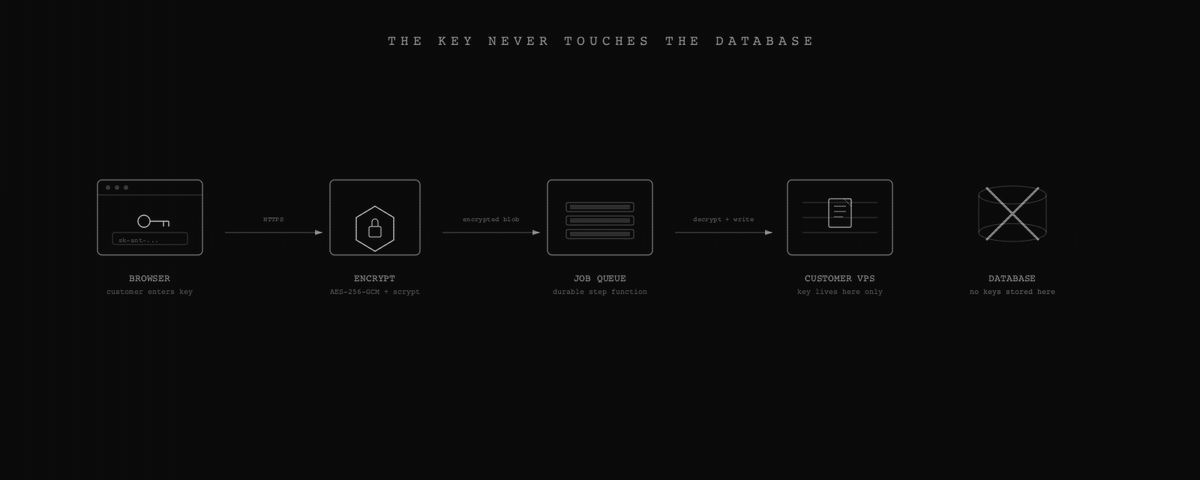
If our database leaks tomorrow, no API keys come with it. Though a database breach could still yield customer identifiers, tunnel metadata, and management endpoints, which is why defense in depth matters.
The tunnel changes everything
Traditional VPS hosting means your server has a public IP. You harden SSH, set up fail2ban, keep packages updated, and hope nobody finds a zero-day before you patch it.
I still do the hardening. Every VPS gets automatic security updates, fail2ban, and SSH locked down to key-only auth with no root login. But the big architectural win is that none of the application services are publicly reachable. Every VPS runs behind a Cloudflare Tunnel. The AI dashboard and management API bind to localhost only. The only way to reach them is through Cloudflare’s edge network.
The tunnel creates two routes: one for the customer’s AI dashboard and one for our management API. With the firewall set to deny all incoming and the tunnel using outbound-only connections, an attacker scanning from the public internet finds nothing useful.
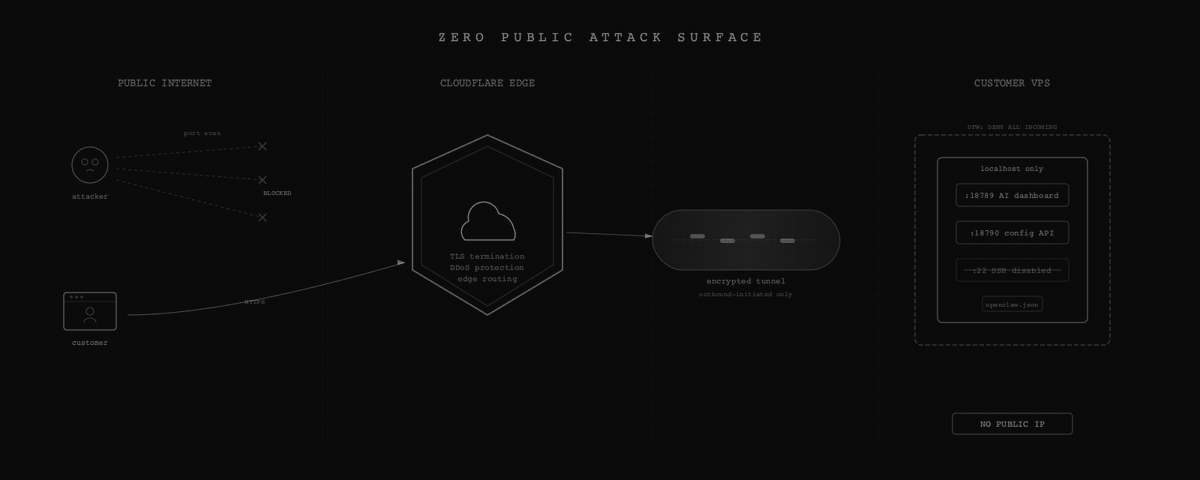
This materially reduces the attack surface compared to traditional hosting. The “scan IP, find open port, exploit service” attack path is gone. But it introduces new dependencies: Cloudflare account security, tunnel token protection, and the management plane itself all become things that need hardening. It’s shifting the perimeter, not eliminating it.
A management plane that updates itself
Each VPS runs a small Node.js service that manages configuration. It handles installing integrations, updating any binary files, and checking health status. Every request to the API is authenticated using constant-time comparison to avoid timing side channels, and the API enforces rate limiting and temporary lockouts after repeated failed authentication attempts.
The interesting part is how this API updates itself. When we push a new version, the endpoint:
- Validates the new code
- Backs up the current script
- Writes the new script
- Sends the HTTP response
- Spawns a fully detached bash script that restarts the service That detached script includes a rollback: if the new version doesn’t come up on the expected port within a few seconds, it restores the backup and restarts again. The script survives the Node process being killed because it’s detached.
I learned this the hard way. An earlier approach used a delayed restart, but the service manager kills the process that scheduled the delay. If the new script fails to start, there’s no recovery without a hard reset on the server. That happened once. It was not fun.
Shell injection is the enemy
When a customer sets up Telegram, they paste a bot token. When they connect Google, they enter OAuth credentials. These values could end up in shell commands on the VPS if we’re not careful.
The primary defense is avoiding shell interpolation of user input entirely. Configuration is constructed as structured data on the server, serialized, and transported to the VPS in a safe, non-executable form, where it is decoded and written to disk. At no point are user-provided values inserted into a shell command or evaluated by a shell parser.
The encoding step is only a transport mechanism. The security guarantee comes from ensuring that untrusted input is always treated as data, never as executable instructions.
In the few cases where system commands are required, they are invoked without a shell and with strict input validation. All externally supplied values are validated against narrow allowlists before use, and anything that does not match expected formats is rejected before it can reach an execution boundary.
Supply chain on customer servers
This one is the one that worries me the most. When you install software on your own machine, you accept the risk. When you install software on a customer’s machine, you’re making that decision for them.
I take a conservative approach to software supply chain security on customer servers. Only explicitly approved, version-pinned artifacts are installed, and nothing is fetched or executed dynamically at runtime. Third-party components are sourced from known repositories, reviewed before inclusion, and pinned to specific, vetted versions.
Core binaries are version-pinned, and new servers are provisioned with known-good releases rather than floating “latest” tags. Updates are rolled out deliberately using a controlled process that includes validation, health checks, and automatic rollback if an update fails to start correctly.
This approach ensures that what runs on a customer’s server is predictable, reproducible, and limited to a small, well-defined set of reviewed components, reducing the risk of unexpected or untrusted code entering the system.
The takeaway
Security architecture for a hosting platform isn’t about checking boxes. It’s about understanding the trust relationship. Your customer gave you their API key. They trust you with their OAuth tokens. They can’t SSH into their own server to verify what you’re running.
That trust means: encrypt in transit and at rest, persist nothing you don’t need, reduce the attack surface and harden what remains, and treat every user input as hostile until validated otherwise.
The tunnel-based architecture eliminates direct public exposure, and isolating each customer on their own VPS prevents cross-customer access. Sensitive credentials are not persisted in the platform’s primary data store, which limits the impact of a potential breach. The platform is designed as a control plane rather than a data plane, and that control plane is treated as a security-critical component and protected accordingly.
If you’re building something that handles other people’s secrets, start from “what can I avoid storing?” and work backward from there.