I Built a Claude Skill That Scaffolds Arbitrum dApps. Here's How It Works.

Most AI coding tutorials stop at “hello world.” A counter app, a to-do list, maybe a smart contract that compiles but never connects to anything. The gap between that and a working dApp with a local chain, deployed contracts, and a wired-up frontend is where people stall.
I built a Claude skill that closes that gap. It gives Claude the context to scaffold a complete Arbitrum dApp, from contracts through frontend, without you configuring the glue between layers.
What a Claude skill actually is
A skill is a structured set of instructions, references, and decision logic that loads into Claude’s context when you start a task. Think of it like giving a contractor blueprints, material specifications, and building codes before they start, rather than answering questions one at a time as they go.
Without a skill, Claude guesses. It picks libraries from training data. It uses patterns that might be outdated. It doesn’t know your preferences for project structure or tooling.
With this skill loaded, Claude knows the exact stack, project layout, and commands to run at each step.
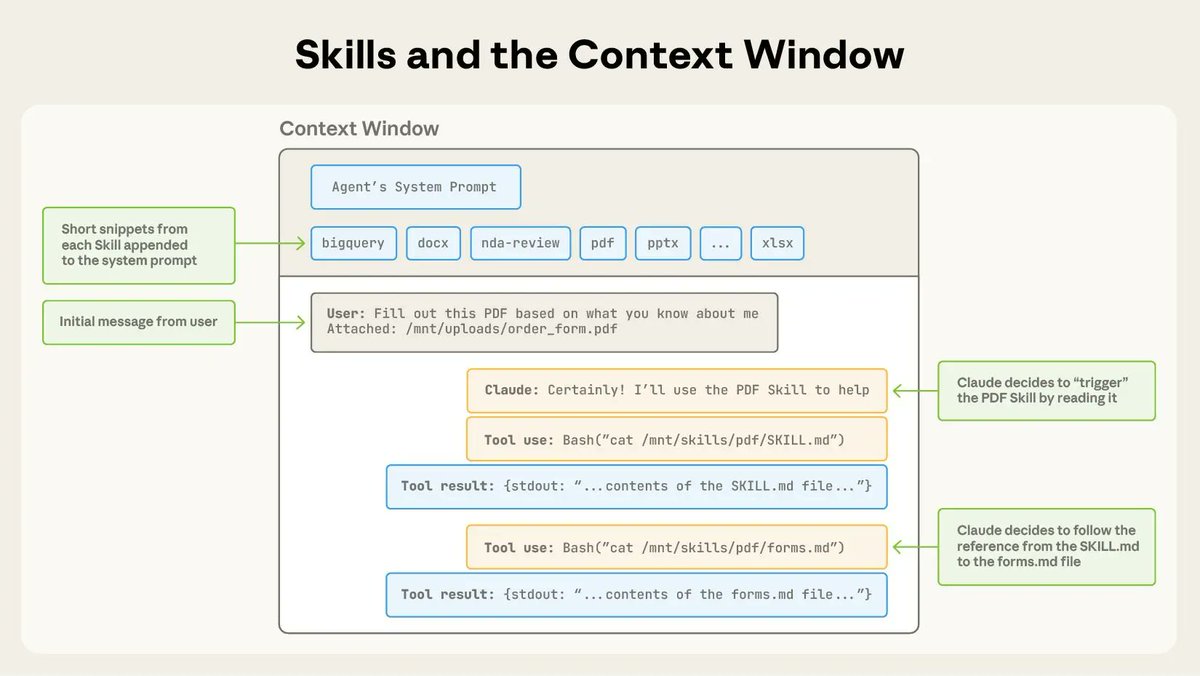 Skills are triggered in the context window via your system prompt. (Source: Anthropic Blog [https://claude.com/blog/equipping-agents-for-the-real-world-with-agent-skills])
The stack
The skill is opinionated. That’s intentional. When Claude has to choose between five ways to do something, it often picks the wrong one or asks you to decide. Narrowing the options produces better results.
Here’s what the skill specifies:
Smart contracts get two paths. Stylus (via the Rust SDK) for contracts where you want lower gas costs through Wasm execution. Solidity via Foundry for rapid prototyping and broad tooling compatibility. Both are fully interoperable on Arbitrum, and the skill knows how to set up either or both in the same project.
The local chain is nitro-devnode, Arbitrum’s Docker-based local node. It runs at localhost:8547, ships with pre-funded accounts, and behaves like a real Arbitrum chain. No mocking, no simulated environments.
The frontend uses viem and wagmi with React. The skill enforces viem for all chain interaction because it’s type-safe, tree-shakeable, and the supports modern developer workflows.
pnpm manages the monorepo. The whole project lives in a single workspace with apps/frontend, apps/contracts-stylus, apps/contracts-solidity, and apps/nitro-devnode as subdirectories.
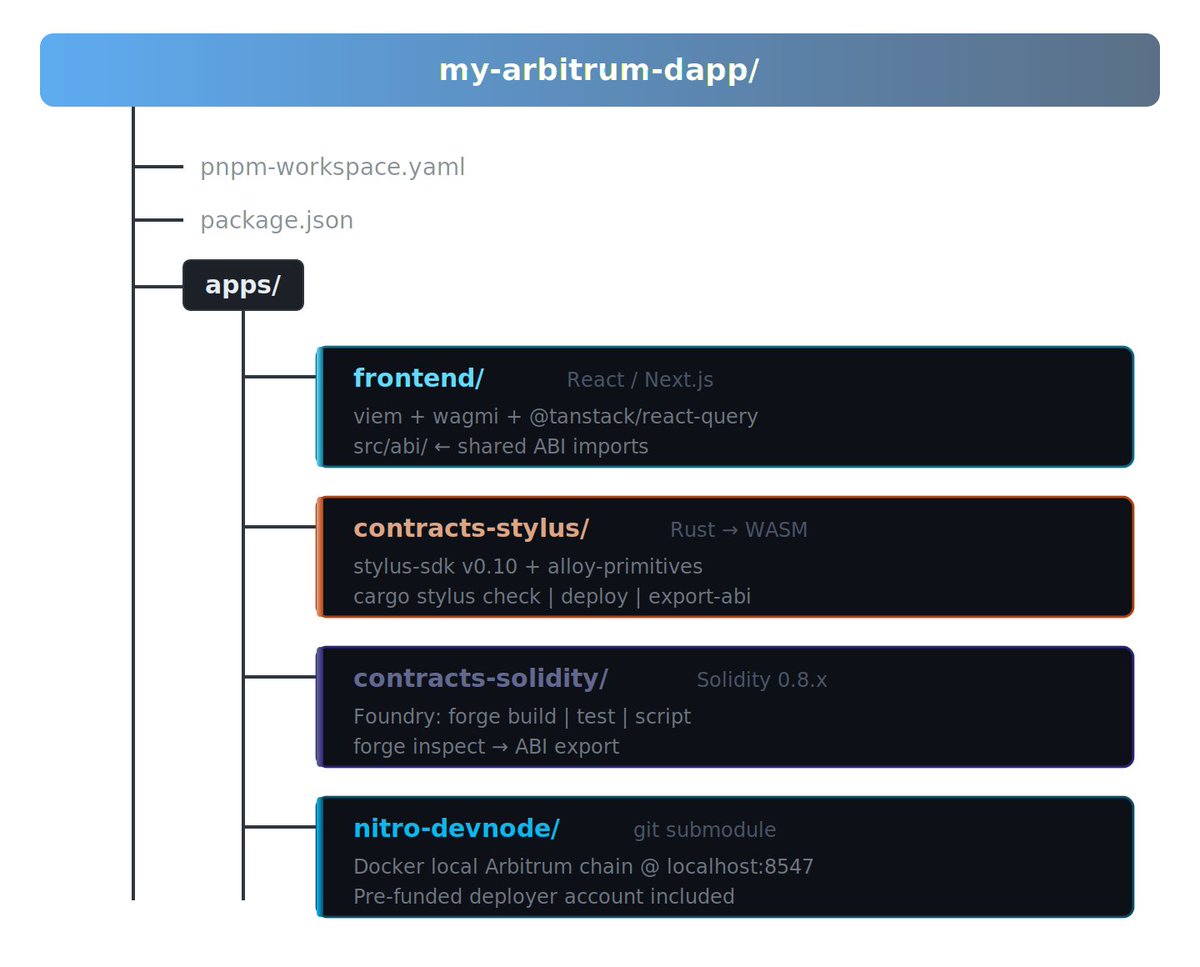 The monorepo layout the skill generates. Each directory maps to a layer of the stack, and Claude knows which tools and commands belong to each.
How the decision flow works
When you ask Claude to start a new contract, the skill walks it through a decision tree:
Need maximum performance or lower gas? It goes with Stylus Rust and loads the Stylus-specific reference docs, including the sol_storage! macro patterns, #[public] attribute usage, and cargo-stylus CLI commands.
Need broad tooling compatibility or fast iteration? It picks Solidity with Foundry and loads the Forge build, test, and deploy workflow.
Want both? The skill sets up a hybrid project. Stylus and Solidity contracts share the same address space and ABI encoding on Arbitrum, so cross-contract calls work without bridges or adapters.
This decision happens automatically. You describe what you’re building, and the skill routes Claude to the right path with the right reference material loaded.
What the references contain
The skill isn’t just one instruction file. It includes six reference documents Claude loads as needed:
stylus-rust-contracts.md covers storage with sol_storage!, public methods, payable functions, events, cross-contract calls, error handling, and the export-abi workflow. Working code for each pattern.
solidity-contracts.md covers Arbitrum-specific Solidity patterns and the Foundry workflow.
frontend-integration.md has the full viem and wagmi setup: chain config for local devnode, testnets, and mainnet. Contract reads, writes, event watching, and typed error handling.
local-devnode.md documents Docker setup, the pre-funded deployer account, port config, and troubleshooting.
deployment.md and testing.md cover the path from local to mainnet, and testing strategies for both languages.
Claude doesn’t load all of these at once. It reads the main skill file, determines what you need, and pulls in the relevant references. Context stays focused.
A concrete example
I recorded a full walkthrough of this process. If you want to see it in action before reading the breakdown, you can go watch it on YouTube.
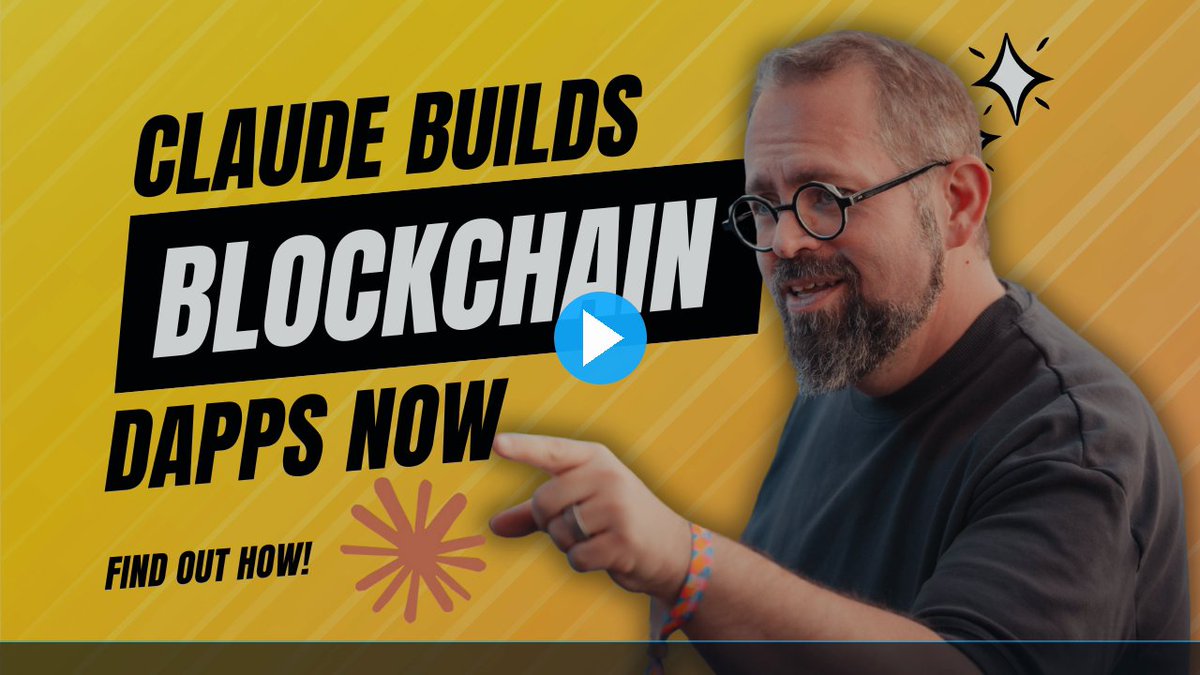 Watch the video at https://youtu.be/vsejiaOTmJA
Say you ask Claude: “Build me an NFT contract on Arbitrum using Rust with a React frontend.”
Here’s what happens with the skill loaded:
Claude scaffolds the monorepo with the pnpm workspace config. It runs cargo stylus new for the contract directory and pnpm create next-app for the frontend.
It writes the Stylus contract using sol_storage! for the NFT storage layout, #[public] methods for minting and metadata, and the sol! macro for Transfer events.
It exports the ABI with cargo stylus export-abi and drops it into the frontend’s src/abi/ directory as a typed constant with as const for full TypeScript inference.
It wires up the wagmi provider, creates a mint button component using useWriteContract and useWaitForTransactionReceipt, and configures the chain for the local devnode.
It starts the devnode, deploys the contract, and connects the frontend to it. The whole thing compiles, deploys locally, and the frontend can mint. You didn’t copy an ABI, look up a chain ID, or configure a single RPC endpoint.
Why skills beat prompting
You could put all of this into a long prompt. But prompts have problems.
They’re one-shot. You paste it, Claude reads it, and then conversation fills the context. The instructions drift further from where Claude is working.
They don’t branch. A prompt gives Claude everything at once. A skill gives it a decision tree with references loaded on demand.
They’re not reusable. Every new conversation requires the same paste. A skill loads automatically.
The Arbitrum dApp skill is structured knowledge that stays consistent across every project you start.
Who this is for
If you’re building on Arbitrum and you use Claude as a coding tool, this skill makes that process more reliable. It won’t write your business logic, but it handles scaffolding, tooling setup, and cross-layer wiring that eats the first few hours of any new project.
If you’ve tried building dApps with Claude before and found it picking outdated libraries or structuring projects badly, that’s what this solves. Claude is good at writing code. It’s bad at knowing which code to write for a specific ecosystem. The skill fills that gap.
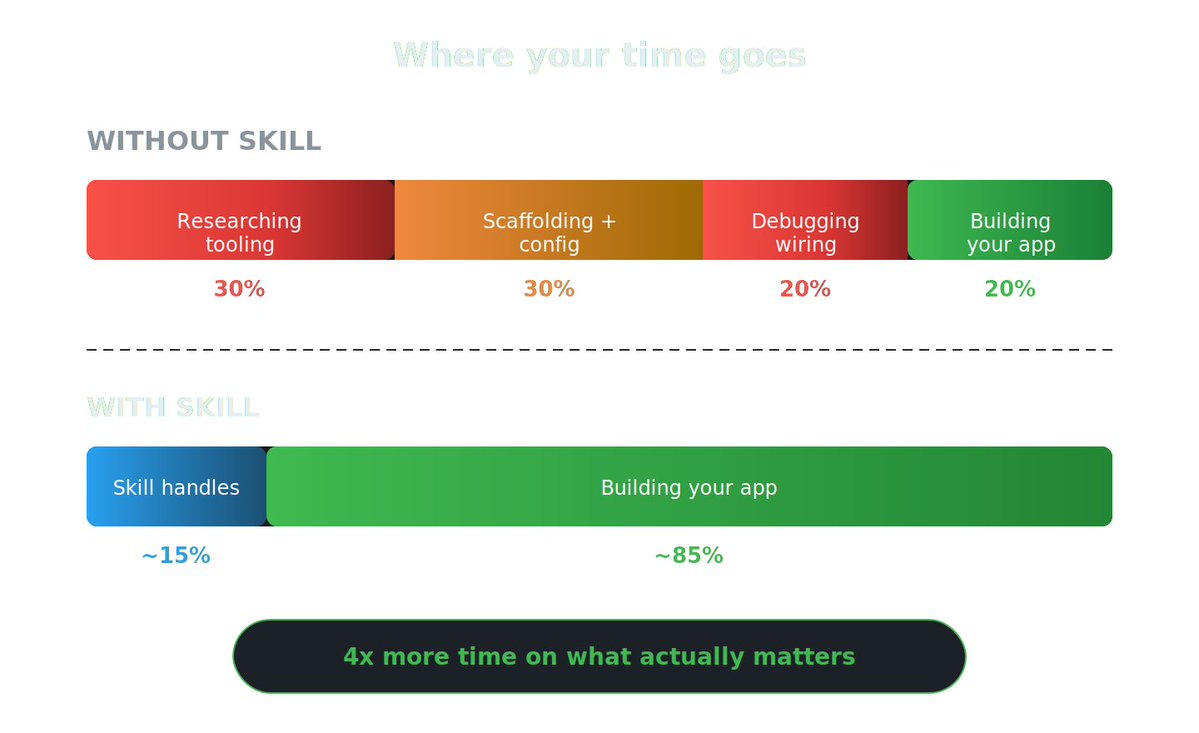 Most of a new project’s time goes to tooling research, scaffolding, and debugging wiring between layers. The skill compresses all of that into one step.
Try it yourself
The skill and all its references are available on GitHub and ClawHub. You can install it in one line:
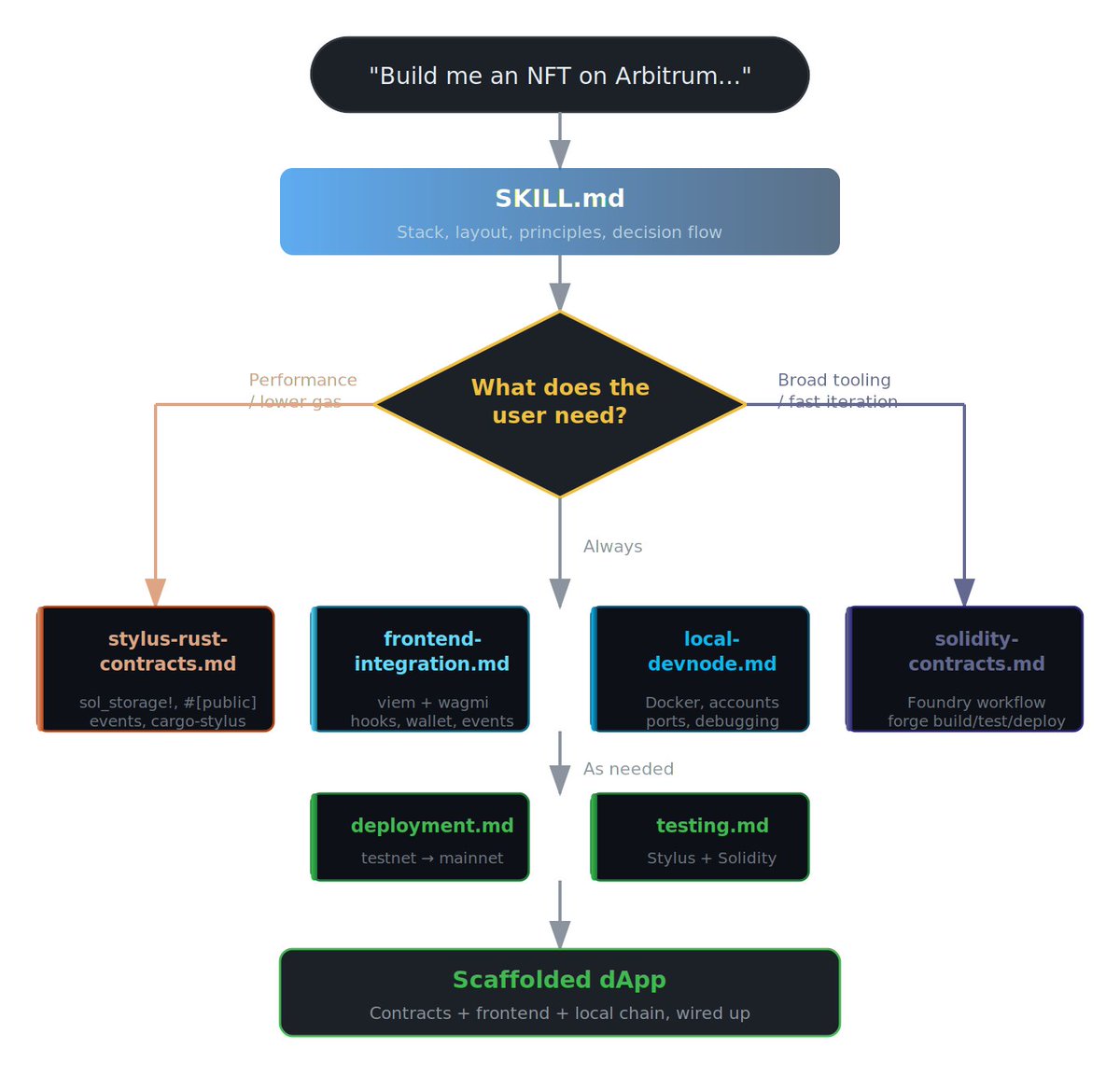 How the skill routes Claude’s decisions. Your prompt enters at the top, the decision flow picks the right contract path, and only the relevant reference docs get loaded into context.
bash <(curl -s https://raw.githubusercontent.com/hummusonrails/arbitrum-dapp-skill/main/install.sh)Load it into your Claude environment and ask it to build something. Start with the counter example if you want to see the full flow before building something custom.
If you build something with it, I want to hear about it.